Claude Desktop for Mac 配置第三方 API Key 和 Base URL 完整指南
TL;DR
Claude Desktop for Mac(v1.4758.0 起)支持接入任意 Anthropic Messages 兼容的网关,通过 Developer Mode 下的 “Configure Third-Party Inference” 窗口配置即可。全程不需要 Anthropic 官方账号。本文以接入本地自建网关 BlueRouter(http://127.0.0.1:18966)为例,记录完整配置步骤、底层机制、以及实际踩过的坑。
整体拓扑
flowchart LR
    A[Claude Desktop<br/>Cowork / Code tab] -->|POST /v1/messages<br/>x-api-key: sk-bp-xxx| B[Local Gateway<br/>BlueRouter :18966]
    B -->|mapping rewrite<br/>+ sanitize payload| C[Upstream AI Gateway<br/>*.internal]
    C --> D1[Anthropic Bedrock<br/>Claude Opus / Sonnet]
    C --> D2[DeepSeek / Kimi<br/>GLM / Qwen / MiniMax]
    style A fill:#f9e79f
    style B fill:#aed6f1
    style C fill:#d5f5e3
一、前置验证:先确认你的网关协议兼容
Claude Desktop 的第三方模式走 Anthropic /v1/messages 协议(不是 OpenAI /v1/chat/completions)。配置之前用 curl 验证一下:
curl -X POST http://127.0.0.1:18966/v1/messages \ -H "content-type: application/json" \ -H "anthropic-version: 2023-06-01" \ -H "x-api-key: YOUR_KEY" \ -d '{ "model": "claude-sonnet-4-5-20250929", "max_tokens": 30, "messages": [{"role":"user","content":"say OK"}] }' 期望返回:HTTP 200 + 形如 {"id":"msg_...", "content":[{"type":"text","text":"OK"}], ...} 的 Anthropic 格式 JSON。
两种协议格式的差异直接决定能不能用:
sequenceDiagram
    participant Client as curl / Claude Desktop
    participant GW as Your Gateway :18966
    participant UP as Upstream LLM

    Client->>GW: POST /v1/messages<br/>(Anthropic format)
    GW->>UP: forward / translate
    UP-->>GW: response
    alt Gateway keeps Anthropic format
        GW-->>Client: event:message_start<br/>event:content_block_delta<br/>...<br/>✅ parsed correctly
    else Gateway emits OpenAI format
        GW-->>Client: data:{"choices":[{"delta":...}]}<br/>❌ Claude Desktop parses empty<br/>→ "empty or malformed"
    end
如果返回的是 OpenAI 格式({"choices":[{"delta":...}]}),说明网关只做 OpenAI 协议透传,Claude Desktop 会报:
API Error: API returned an empty or malformed response (HTTP 200) — check for a proxy or gateway intercepting the request 这种情况下需要在网关前加一层 OpenAI → Anthropic 协议转换层(如 LiteLLM)。
二、Claude Desktop 支持的配置字段
从 Claude Desktop 的 app.asar 反出来,第三方模式的真实 schema 如下:
| 字段 | 类型 | 说明 |
|---|---|---|
inferenceProvider | gateway | vertex | bedrock | foundry | 选 gateway 表示走通用 Anthropic 兼容网关 |
inferenceGatewayBaseUrl | string | 网关基础 URL,如 http://127.0.0.1:18966 |
inferenceGatewayApiKey | string (加密存储) | 通过 macOS Keychain + Electron safeStorage 加密,无法离线写文件 |
inferenceGatewayAuthScheme | x-api-key | bearer | … | 认证 header 方案 |
inferenceGatewayHeaders | object | 自定义 HTTP headers |
inferenceModels | array | 可选白名单,设了就用它覆盖 /v1/models 自动发现 |
关键点:因为 API key 是 safeStorage 加密存储的(Electron 通过系统 Keychain 加密),必须从 GUI 一次性输入,不能直接改配置文件。
实际网关管理页(BlueRouter Models 标签)看起来是这样 —— 可以清晰看到每个模型的 ID / 别名 / Provider 归属,本文后面的”三套命名体系”章节就是从这张表延伸出来的:
三、完整配置步骤
六步流程概览:
flowchart TD
    A[1. Quit Claude Desktop<br/>pkill -x Claude] --> B[2. Reopen Claude.app<br/>⚠️ do NOT log in]
    B --> C[3. Enable Developer Mode<br/>Help → Troubleshooting]
    C --> D[4. Menu Developer →<br/>Configure Third-Party Inference]
    D --> E[5. Fill setup form:<br/>Provider=Gateway<br/>Base URL / API Key / Auth Scheme]
    E --> F[6. Save — auto GET /v1/models<br/>discovery OK → ready]
    style A fill:#fadbd8
    style F fill:#d5f5e3
1. 退出 Claude Desktop
pkill -x Claude 或 ⌘Q。必须彻底退出,否则已登录的账号态会抢占 provider slot。
2. 重新打开 Claude.app — 不要登录
登录界面直接关掉或忽略。
3. 启用 Developer Mode
菜单栏 → Help → Troubleshooting → Enable Developer Mode
如果菜单里没有这项,说明已经启用过(检查 ~/Library/Application Support/Claude/developer_settings.json,里面应有 "allowDevTools": true)。
4. 打开第三方推理配置
菜单栏会多出 Developer 菜单 → Configure Third-Party Inference
5. 在 Setup 窗口里填写
| 字段 | 填什么 |
|---|---|
| Provider | Gateway |
| Base URL | http://127.0.0.1:18966(或你的网关地址) |
| Auth Scheme | x-api-key(多数开源网关用这个) |
| API Key | 你的 API key |
| Extra Headers | 留空 |
保存时,Claude Desktop 会自动 GET /v1/models 做一次 discovery,Setup 页面会提示 “Gateway discovery OK, N models loaded”。
6. 重启 / 进入主界面即可使用
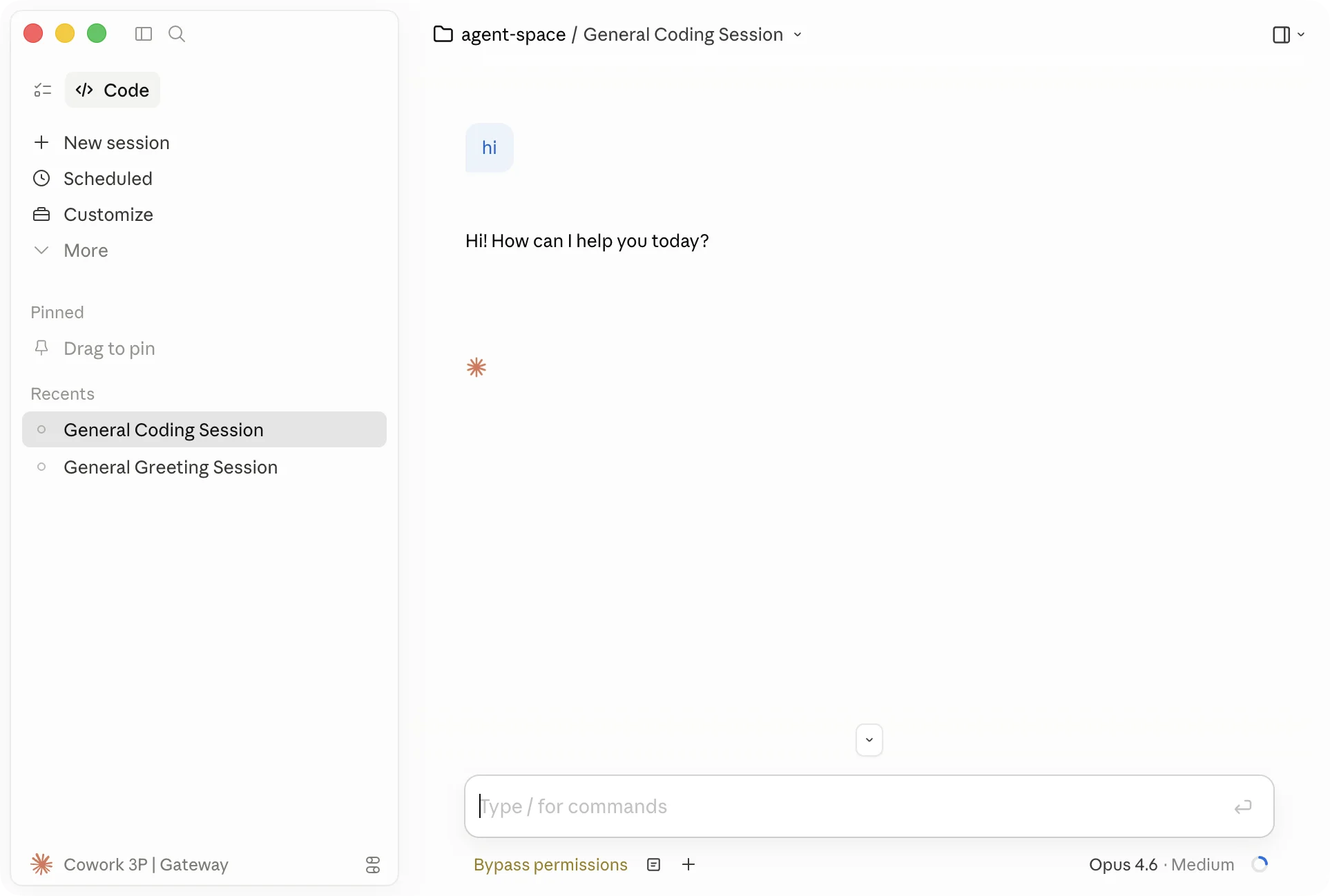
左下角会显示 “Cowork 3P | Gateway”,说明当前处于第三方模式。Claude Code 标签此时就完全可用了:
四、三套命名体系:别被混淆
Claude Desktop 展示出来的模型名和网关实际的 id 可能完全不同,这是因为中间隔了三层映射:
| 层 | 哪里看到 | 例子 |
|---|---|---|
| ① 上游真实内部 ID | 网关管理页 | Claude-4.6-Opus |
| ② 网关对外暴露 ID | /v1/models 返回的 id | claude-opus-4-20250514 |
| ③ Claude Desktop 美化名 | 下拉框 UI | Opus 4 |
为什么要三层?
- ② 层通常故意做成 Anthropic 官方规范 id(带日期后缀),这样任何 Anthropic SDK / 客户端都能原生识别。
- ③ 层是 Claude Desktop 内置的白名单映射:它识别
claude-opus-4-*/claude-sonnet-4-*后显示为Opus 4/Sonnet 4,不在白名单的(deepseek / glm / qwen 等)原样显示 id。
配置完后 Claude Desktop 下拉框显示 Opus 4.6 其实对应网关 claude-opus-4-20250514,客户端请求 body 里传的是第 ② 层 id,网关再映射到第 ① 层路由到上游。
以 Claude Opus 为例走一遍完整链路:
flowchart TD
    U["③ UI display name<br/><b>Opus 4</b>"]
    P["② Model field in request body<br/><code>claude-opus-4-20250514</code>"]
    G["Gateway resolveModel() looks up Mappings"]
    I["① Upstream catalog id<br/><code>Claude-4.6-Opus</code>"]
    B["Anthropic Bedrock backend"]

    U -->|"Claude Desktop<br/>built-in alias map"| P
    P -->|"POST /v1/messages"| G
    G -->|"rewrite from → to"| I
    I --> B

    style U fill:#fef9e7,stroke:#f1c40f
    style P fill:#eaf2f8,stroke:#3498db
    style I fill:#eafaf1,stroke:#27ae60
    style G fill:#fff,stroke:#999,stroke-dasharray:3
deepseek-chat、glm-4-plus 等非 Claude 模型同理:UI 层没美化(不在 Claude Desktop 白名单里),所以 ③ 和 ② 长得一样;到了 ① 才映射成上游真实 id(如 Baidu-DeepSeek-V3.2)。
请求方向:客户端拿 UI 显示名选了 Opus 4,实际请求 body 里传的是 ② 的 claude-opus-4-20250514,网关内 resolveModel() 查 Mappings 改写成 ① 的 Claude-4.6-Opus,转发给上游。
五、常见坑
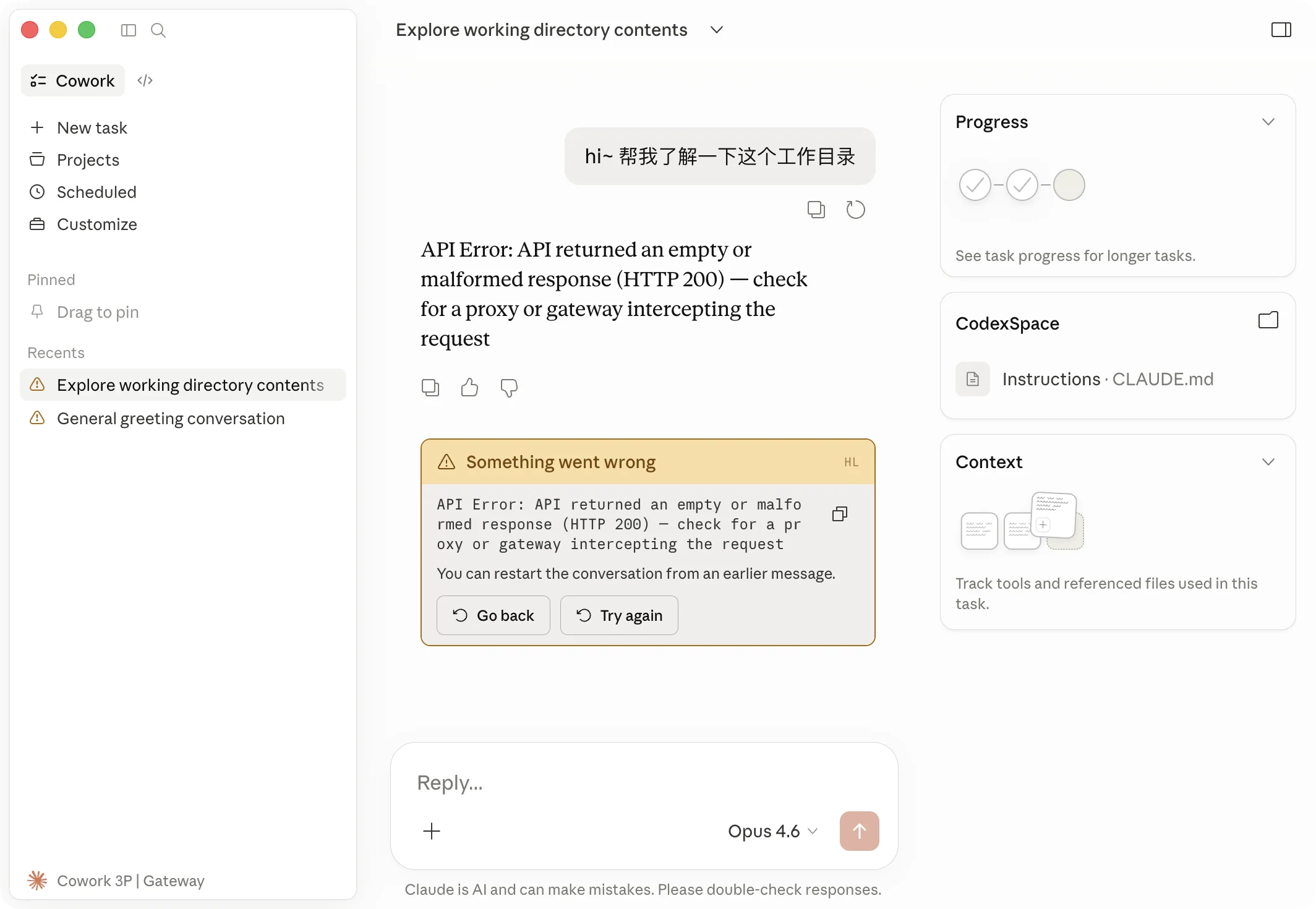
坑 1:Cowork Chat 页面报 “empty or malformed response”
症状:/v1/messages 返回 HTTP 200 但 Claude Desktop 说响应为空。UI 上长这样:
真因(我自己踩过的最坑):不是协议问题,而是 Cowork 发的请求里 cache_control.ttl 顺序违反 Anthropic 规则:
messages.2.content.2.cache_control.ttl: a ttl='1h' cache_control block must not come after a ttl='5m' cache_control block. Note that blocks are processed in the following order: tools, system, messages. Anthropic API 要求:所有 ttl='1h' 的 cache_control block 必须出现在 ttl='5m' 块之前(按 tools → system → messages 扫描顺序)。Cowork 的 SDK 在 system 和最后一个 user message 都打了 ttl='1h' 标记,而内部 SDK 在中间插入了 ttl='5m' 的块,导致顺序违反。
顺序问题与修复示意:
sequenceDiagram
    participant CW as Cowork (Claude Desktop)
    participant GW as BlueRouter
    participant UP as Anthropic Bedrock

    Note over CW,UP: ❌ Original behavior (fails)
    CW->>GW: system[ttl=1h] + tools[ttl=5m] + user[ttl=1h]
    GW->>UP: forward as-is
    UP-->>GW: HTTP 200 + SSE event:error<br/>"1h must not come after 5m"
    GW-->>CW: error stream relayed
    Note right of CW: UI shows<br/>"empty or malformed"

    Note over CW,UP: ✅ After downgrade hook
    CW->>GW: same payload
    GW->>GW: isCoworkUA(UA)? → scan tools/system/messages<br/>rewrite every ttl='1h' to '5m'
    GW->>UP: system[ttl=5m] + tools[ttl=5m] + user[ttl=5m]
    UP-->>GW: HTTP 200 + normal SSE
    GW-->>CW: normal response
解决:在网关侧做请求改写,把 Cowork 请求里的 ttl='1h' 全部降级为 ttl='5m'。Claude Code CLI 的 UA 是 claude-code,不受此问题影响,保留其 1h 缓存可以显著降低长会话的 token 成本。
UA 识别方案(以 BlueRouter 为例):
func isCoworkUA(ua string) bool { return strings.Contains(ua, "claude-desktop-3p") || strings.Contains(ua, "local-agent") } 两个 UA 标记都是 Cowork 的(旧版用 claude-desktop-3p,新版用 local-agent)。
调试小坑:我第一次只匹配了
claude-desktop-3p,上线后 Cowork 还在报错。查~/.config/bluecode-proxy/errors.log才发现新版 Cowork UA 已变成(external, local-agent)。UA 标记会随 Claude Desktop 版本演进,匹配多个 token 比单值匹配稳健。完整代码见文末附录。
坑 2:每次启动默认都是第一个模型(而且是非 Claude 的)
Claude Desktop 第三方模式不跨 session 持久化模型选择。新 session 默认是 /v1/models 返回数组的第一个元素,按字母序排。
怎么确认的:在
~/Library/Application Support/Claude/Local Storage/leveldb/+IndexedDB/全文 grep 过selectedModel/lastModel/currentModel/preferredModel,一条都没有。官方账号模式的模型偏好存在 Anthropic 账号云端配置里;走 gateway 就没有这条路径了,每次启动重新从 discovery 数组取第 0 个。
解决方案 A:在 Setup 窗口的 inferenceModels 字段填白名单,只放你想用的 Claude 模型。
解决方案 B:在网关侧改 /v1/models 响应顺序,把 Claude 模型排前面。BlueRouter 实现:
sort.SliceStable(list, func(i, j int) bool { ci, cj := isClaude(list[i].ID, list[i].Name), isClaude(list[j].ID, list[j].Name) if ci != cj { return ci } return list[i].ID < list[j].ID }) 坑 3:选了非 Claude 模型就报错
如果网关对非 Claude 模型只做 OpenAI 协议 passthrough,Claude Desktop 解析 OpenAI 流会解出空 → 报 “empty or malformed response”。
解决:要么在下拉框里只选 Claude 系模型(Opus / Sonnet / Haiku),要么在网关前加 LiteLLM 做 OpenAI → Anthropic 转换。
坑 4:Chat 页面不可用或灰掉
第三方 provider 模式下官方客户端的 Chat 面板可能会被禁用或隐藏,这是官方产品限制。可用的是 Cowork / Code 等 agentic 功能。
六、切换回官方模式
Developer → Configure Third-Party Inference → Reset 即可,不会丢账号。
七、企业批量部署
如果是组织级部署,可以用 macOS .mobileconfig 文件 + MDM 推送,无需每台机器手动配置。支持的 provider 包括:
gateway— 通用 Anthropic 兼容网关bedrock— AWS Bedrockvertex— Google Vertex AIfoundry— Azure AI Foundry
配置完 Setup UI 后,点右上角 Export 按钮即可直接导出 .mobileconfig(macOS)或 .reg(Windows),交给 Jamf / Kandji / Mosyle / Intune / Group Policy 分发。Windows 注册表键位于 HKCU\SOFTWARE\Policies\Claude,macOS domain 是 com.anthropic.claudefordesktop。
插件目录(第三方部署下 plugin 以本地目录 mount 方式分发,而非 Web 市场):
- macOS:
/Library/Application Support/Claude/org-plugins/ - Windows:
C:\ProgramData\Claude\org-plugins\
官方说明:Chat 标签在第三方部署下故意不提供(Anthropic 官方文档原话:”No Chat tab — chat isn’t available in this deployment”)。可用的就是 Cowork + Code。
参考
官方文档(Anthropic support)
- Use Claude Cowork with third-party platforms — 功能总览、FAQ,说明哪些功能在 3p 模式可用/不可用
- Install and configure Claude Cowork with third-party platforms — 完整部署手册,含全部 MDM 键位(
inferenceProvider/inferenceGatewayBaseUrl/inferenceGatewayApiKey等)和 VDI 部署说明 - Use Claude for Excel, PowerPoint, and Word with third-party platforms — Office 插件走相同四种 provider
- Anthropic support 检索:support.claude.com/?q=3p
本地配置路径
- Claude Desktop 用户数据目录:
~/Library/Application Support/Claude/ - Developer flag 持久化文件:
~/Library/Application Support/Claude/developer_settings.json - 插件目录(3p 模式):
/Library/Application Support/Claude/org-plugins/
本文调试用的开源网关
- BlueRouter 源码:iqiancheng/bluecode-proxy(本文涉及的
/v1/models透明化、Cowork cache_control 修复在 commitea994e3)
本文基于 Claude Desktop v1.4758.0 + Anthropic support 官方文档(2026-04 版本)整理。